|
SONY VPL-FHZ60
HISTORY and COMMENTS
|
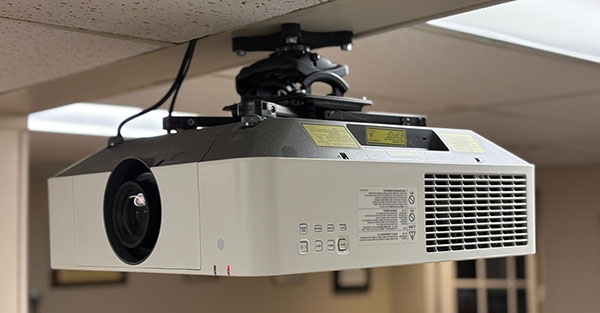
I recently upgraded my basement into a robust Home Theater. I had planned on installing a 85" LCD on one wall, but when a projector was given to me I quickly changed my plans.
The device was a Sony VPL-FHZ60 which was sold from 2015-2018. Retailing at $8,000 it was intended for museums, art galleries, and large venues. With 5,000 lumens and a contrast ratio of 10,000:1 it's WUXGA format has a resolution of 1920x1200 which is slightly better than Blu-Ray. The 3LCD light source is rated for 20,000 hours.
I mounted it under a crossbeam in the center of the room which put the unit directly above my head over the sofa. One of the major worries of people considering a home theater projector is fan noise. This is unfounded. If you are considering a projector mild fan noise is part of the experience but there's no need to obsess about it. The Sony fan is very quiet at 28db and the only time I can hear it is moments of complete silence during a movie. Even then its a small whisper barely louder than room noise.
I mounted it under a crossbeam in the center of the room which put the unit directly above my head over the sofa. One of the major worries of people considering a home theater projector is fan noise. This is unfounded. If you are considering a projector mild fan noise is part of the experience but there's no need to obsess about it. The Sony fan is very quiet at 28db and the only time I can hear it is moments of complete silence during a movie. Even then its a small whisper barely louder than room noise.
 |
A projector provides a different movie experience than a flat panel TV. The energy and "bounce" of the images off the screen are exciting and the sense of being in a theater are much more fun IMO. So while a TV can provide razor-sharp detail and deeper blacks, a projector really elevates the experience in a unique way. My PC uses a Radeon RX-560 2GB video card over HDMI 2.0 to the projector. This card supports HDMI 4K up to 4096 x 2160 and HDR10. Even though the projector isn't capable of these resolutions this ensures the best signal possible reaches the Sony. In my totally-dark basement the color intensity and realism are excellent. Using VLC, Blu-Ray and 4K films have a pop, clarity, and richness that make me smile. Inner detail and skin texture is wonderful. It make not be actual 4K but is very close, its easy to see why this projector retailed for $8,000. The only shortcoming is that the black-levels are very good but average. Only my videophile friends would notice and the super-brightness and overall performance in other areas make it a non-issue. |
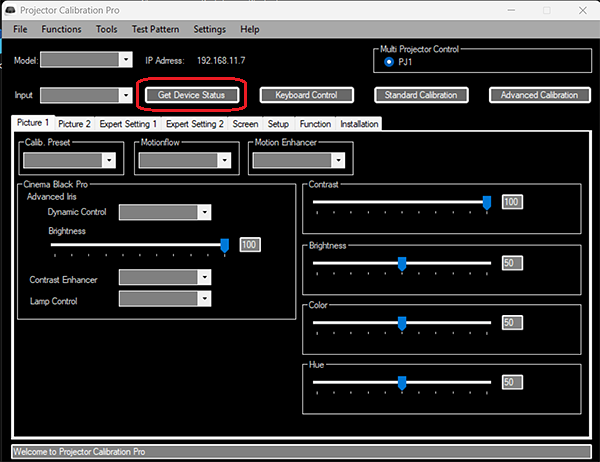
CALIBRATION A good tool to locate is Sony "Projector Calibration Pro" software. It has a wide variety of Tools and test patterns for calibration by eye. It also has an Advanced feature for use with expensive 3rd party calibration equipment. Over ethernet the software communicates with the projector real-time and makes internal adjustments. The final version is 1.0.1.4. Here's how I got it to connect:
 |
MY SETTINGS FOR 2026 |
PICTURE MODE - STANDARD
CONTRAST- MAX
BRIGHTNESS - 52
COLOR - 51
HUE - 50
COLOR TEMP - 7500k
SHARPNESS - 53
LIGHT SETTINGS
DYNAMIC CONTROL - OFF
LIGHT OUTPUT MODE - STANDARD
CONSTANT BRIGHTNESS - OFF
REALITY CREATION - ON. RESOLUTION: 8 NR: 15
CONTRAST ENHANCER - OFF
GAMMA MODE - Gamma 2.4
COLOR SPACE - INPUT C-CUSTOM 3
COLOR CORRECTION - OFF
DYNAMIC RANGE - AUTO
CONTRAST- MAX
BRIGHTNESS - 52
COLOR - 51
HUE - 50
COLOR TEMP - 7500k
SHARPNESS - 53
LIGHT SETTINGS
DYNAMIC CONTROL - OFF
LIGHT OUTPUT MODE - STANDARD
CONSTANT BRIGHTNESS - OFF
REALITY CREATION - ON. RESOLUTION: 8 NR: 15
CONTRAST ENHANCER - OFF
GAMMA MODE - Gamma 2.4
COLOR SPACE - INPUT C-CUSTOM 3
COLOR CORRECTION - OFF
DYNAMIC RANGE - AUTO
A setting it took me a while to find is Panel Alignment under the Installation menu. It looks like it has only ON/OFF but right-clicking ON reveals a hidden menu for aligning RBG grid lines. Mine were offset and realigning them made a significant improvement in image clarity. To access the internal Service Menu input ENTER-ENTER-LEFT-ENTER on the remote with the projector on. Nothing seems to happen but a new entry appears at the bottom of the main menu called "Device". In here are A/D Converter, Panel Driver, Display Engine as well as advanced White Balance and Gamma settings. Without a calibration device the only setting that the service manual gives instructions on is P.DRV/ V Common (Power Drive / Vertical Common). This is the voltage applied to each LCD panel internally. 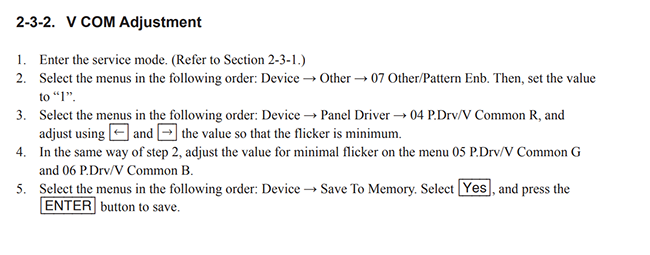
I use MPC-BE with MPC-VR for all films. In MPC-BE in Video/Color Correction, Contrast is set to +20. In MPC-VR Chroma Upscaling is Cattmull-ROM, Upscaling is Lanczos3, and Downscaling is Lanczos. All these settings provide a vibrant, highly detailed image rivaling 4K. |
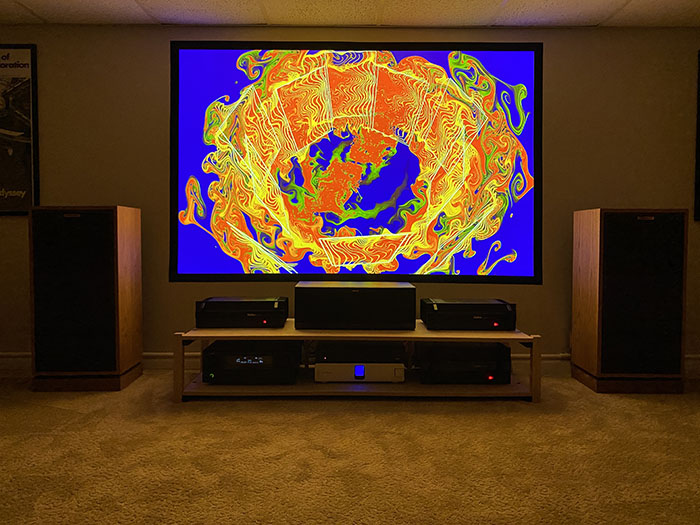
I found the online calculators and videos for calculating the correct screen size for a room to be outdated. They imply 80" screens are too large which seems contrary to the concept of home theater and IMAX. My seating distance is about 11 feet, so I spent time demoing movies against the bare wall and decided a 90" screen was the most satisfying size for my room. I built one using a roll of coated matte projection fabric and stapled it directly to the wall with a 2" black velvet border. |
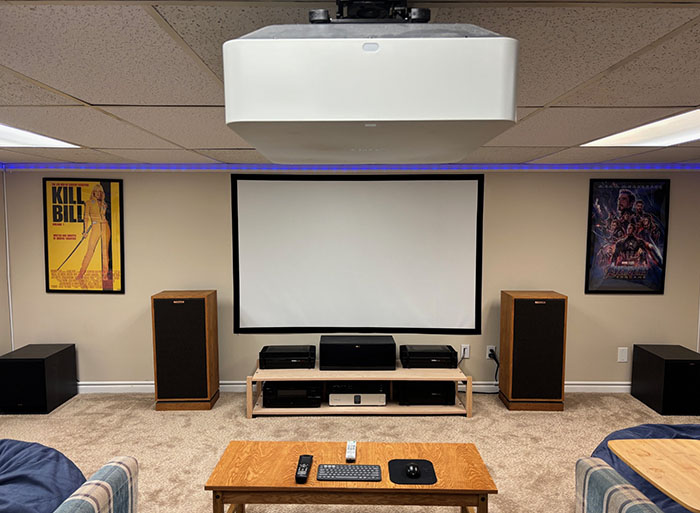 |
The results are exactly what I envisioned |
 |
Datsunzgarage.us ©1997-2026
All mods are illustrative only, perform at your own risk.
Datsun is a registered trademark of Nissan